
Oh fuck. I’ll use this from now on. Except for if I won’t use it next week. Then I’ll forget about it because my memory is a damn sieve.
Just take the next step and make a text file you dump all these commands into and then forget about in a week. When you randomly stumble across it years from now you’ll be able to say “wow, I could have used this 10 months ago if I remembered it existed!”
I make a separate text file per command so I can search them!
Which I dont.
I usually print these out and put them in a safe deposit box at a bank so I never lose them
I keep a persistent “sticky note” (in KDE) drop down on my top bar where I copy/paste important commands, scripts, etc.
I actually remember to use it sometimes.
Use a systemd timer to send yourself a reminder. Discoverd them recently myself and honestly liking them more than cron.
Usually such things have a simple explanation. systemd does a lot with time and date, for example scheduling tasks. It’s quite obvious that it has this capabilities, when you think about it.
me: systemd is not that bloated
systemd:
You need a calendar and time handling anyways for logging purposes and to set timers correctly. It’s likely not that much extra work exposing that functionality.
No, UNIX philosophy demands that every single one of those things is one or more separate things and that half of them are poorly or not at all maintained. Just like God intended.
Finding the next super holiday is a core system feature I could survive without. 🎉
systemd is a great operating system, it just lacks a decent text editor.
Good thing it’s editor agnostic so everybody can do the right thing in the end and choose nano
Funny way to misspell vim
Micro anyone? :D
ed is the standard text editor.
Okay this is cool and all, but why would systemd have a calendar?
(also how do i do this)
As others have said on this thread, it’s because systemd has fairly advanced timer system that basically requires implementing a calendar.
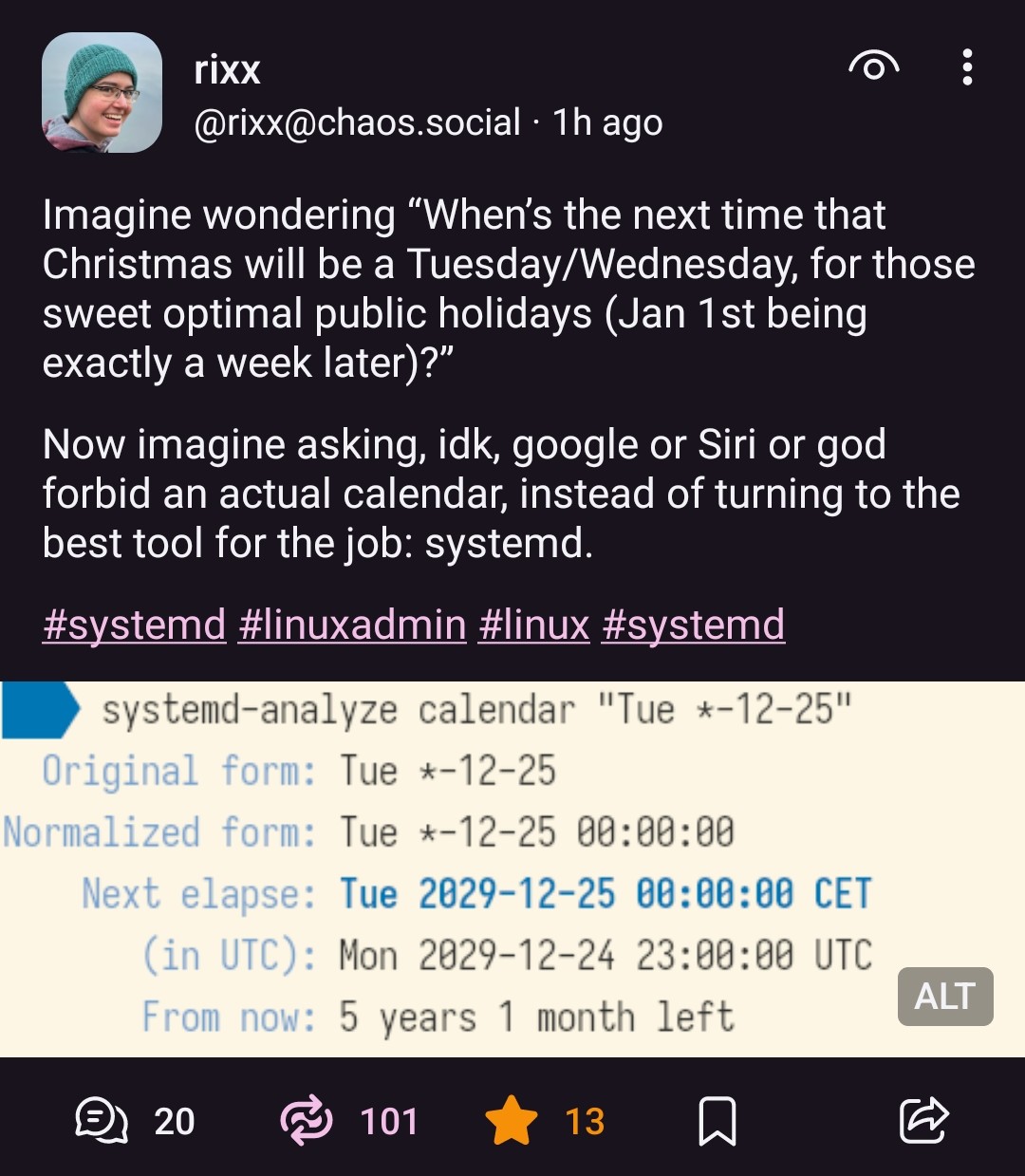
To do it, the command is in the screenshot
systemd-analyze calendar "Tue *-12-25".
Already have a program that does that one thing, well. For stuff about dates, try the
datecommand.As in the case of wanting to know the day of the week of some distant future event’s date:
date -d "YYYY-MM-DD" +"%A".Had that before systemd existed.
… Since “systemd is all you need” do systemd users uninstall date?
@Digit @flamingos it will be replaced by systemd-dated soon
it will be replaced by systemd-dated soon
Not on my machines.
I distrust the tech and the corporation behind the tech being pushed on us as the one true way.
I have no room for the one true way in the Free Software paradigm.
Amen for choice. Grateful for init freedom. … Grateful for date freedom. … And whatever else systemd attempts to embrace-extend-extinguish.
… Just realised, I can’t tell if that[“it will be replaced by systemd-dated soon”]'s satire. Systemd, so bad, one can say horrible things they’ll be doing, and listeners will not be able to tell. Systemd, so bad, it’s beyond susceptibility to satirical reductio-absurdism, already reduced to the absurd.
Well, systemd developers made one of the classic blunders a software developer can do: make a program that has to deal with time and dates. Every time I have to deal with timestamps I’m like “oh shit, here we go again”.
Anyway, as I understood it the reason this is in systemd is because they wanted to replace cron, and it’s fine by me because cron has it’s own brain-hurt. (The cron syntax is something that always makes me squint real hard for a while.)
I’m sorry but Cron is really easy, of all systems.
Try using systemd with an ssh server that you want to have running on a non standard port. On non systemd it’s a 15 second ordeal while on systemd I don’t even know where to start, I pushed it out of my memories. It’s something something create files here, restart demons there, removing other files, it is WAY WAY over complicated
What do you mean? You literally just change the
/etc/sshdconfig to point at a different port do you not?Oh yeah, without systemd that’s all there is to it. With systemd, however, port management is taken out of the ssh config and is done how it was decades ago
I run systemd with a different sshd service port and that’s all I changed
.Aube it’s distro dependent, but Ubuntu updated ssh a while ago to be passed through systemd. Updating the port requires systemd configuration changes
This is basically just a way nicer, more flexible cron syntax being dressed up as something ridiculous. There are legitimate reasons for wanting something like this, like running some sort of resource heavy disk optimization the first Friday evening of every month or something.
Systemd ignored my calendar override for the builtin raid scanner, so every week my server would chug to a halt to scan the entire array.
In true systemd fashion, the documentation could not explain this behavior, so I had to make a full copy override instead of a merge override because reasons.
Did setting OnCalendar to the empty string not work? https://unix.stackexchange.com/a/479745
Thank you for this, I am dumb when it comes to config merge rules because I’ve screwed up ALSA the same way